I Built a Near-Production Roster App in 24 Hours. Here's What Actually Happened.
By Gary
3 May 2026
Replit just turned 10. To celebrate, they ran a 24-hour buildathon and invited people to jump in and build something real. I figured it was worth a crack.
I had a problem sitting right in front of me. A family member was still running their team's roster out of a spreadsheet. Not a fancy one. A regular, chaotic, "who-moved-my-formula" spreadsheet with colour-coded cells, manual tallies, and the occasional mid-week panic when someone called in sick and the whole thing needed rebuilding from scratch.
I wanted to see what was actually possible in 24 hours with the AI coding tools we have today. Could I go from zero to something genuinely useful in a single day?
The short answer is yes. And honestly, it surprised me.
The Problem with Spreadsheet Rosters
If you've ever managed a team roster in a spreadsheet, you already know the pain. You're basically doing the job of a database, a rules engine, a communication system, and a payroll tool all at once, inside a grid that was designed for numbers, not workflows.
Things break silently. Someone gets double-booked. Leave isn't tracked properly. You forget to notify someone of a shift change. Award compliance is a gut feel, not a calculation. And when something goes wrong, there's no audit trail -- just a very stressed manager trying to remember what happened.
This is the kind of problem that software should have solved years ago. And plenty of tools have tried. But a lot of them are either too expensive for small teams, too complicated to set up, or missing the features that actually matter.
So I decided to build one. In a day.
What I Actually Built
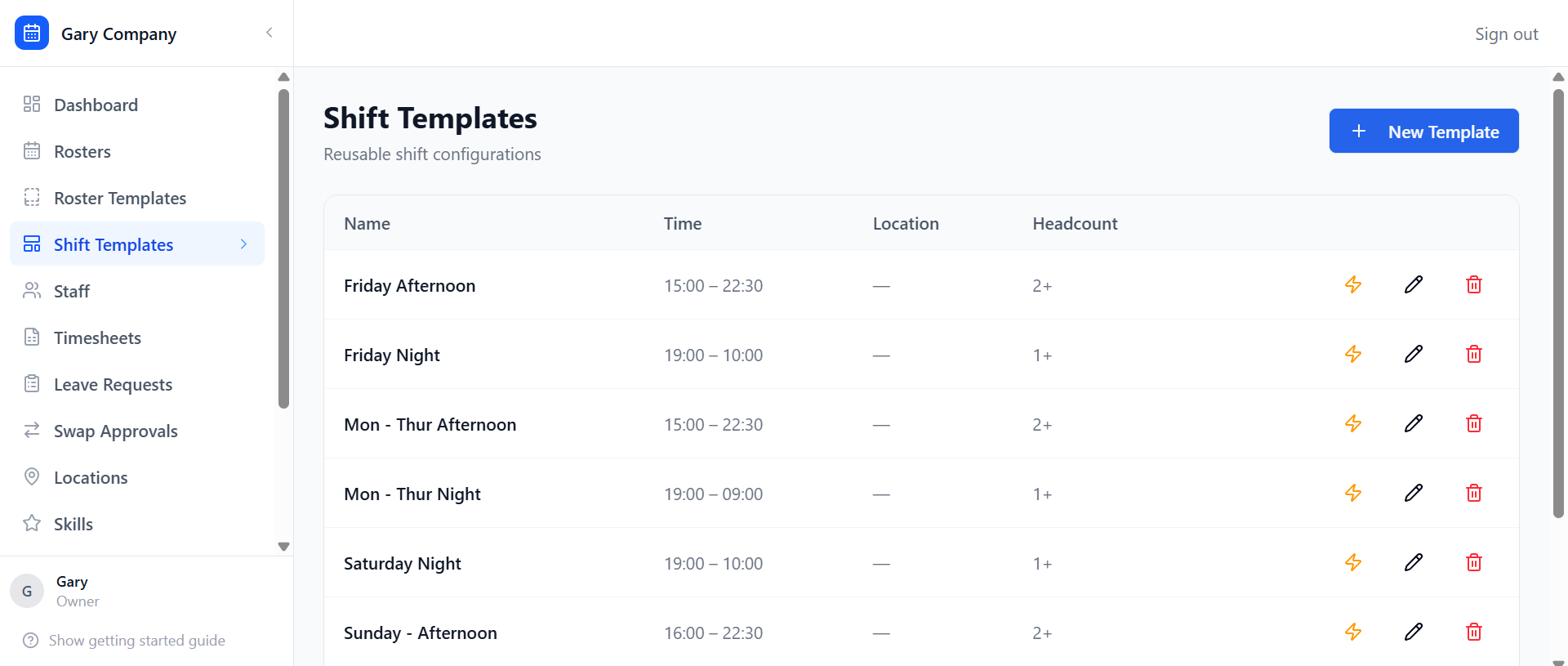
By the end of the 24 hours, I had a fully working multi-tenant roster management platform. Here's what it can do.
For the People Running the Roster
The core of the app is a drag-and-drop roster builder that validates rules in real time. Violations show up in red and block you from saving. Warnings show up in amber so you can make a call. No more hoping you got it right -- the system tells you immediately.
The AI integration is where things get interesting. You can ask Claude to generate an entire roster from scratch. It looks at who's available, what skills are needed, how fairly shifts have been distributed, and what it'll cost -- and it comes back with a proposed roster in seconds. You can also ask it to scan a draft roster you've already built and flag issues like understaffing, fatigue risks, or coverage gaps. Think of it as a second set of eyes that never gets tired.
Leave management is built in properly. Staff submit requests, managers approve or reject them, and approved leave automatically creates a lock in the rule engine so that person can't be accidentally rostered on. No more checking the leave spreadsheet separately before building the roster.
Open shifts work like a mini marketplace. Mark a shift as open, staff can bid on it, and the manager picks the best fit. Shift swaps go through the same approval flow -- staff request it, manager approves, done.
Timesheets let staff log their actual hours for completed shifts. Managers can review them, flag anything that's more than 15 minutes off what was scheduled, and bulk-approve when everything looks good. From there, you can export a payroll CSV with actual hours, rates, and calculated costs -- ready to drop straight into your payroll or ERP System.
For the Staff
Staff get a clean view of their upcoming shifts, a way to log actual hours, and full visibility of their timesheet status. They can browse open shifts and put their hand up for ones they want. They can submit leave requests and track whether they've been approved. They can set their weekly availability and flag one-off exceptions.
Every roster change, approval, or update triggers a notification. Email and SMS, configurable per person. So nobody misses something because they didn't check the app.
Under the Hood
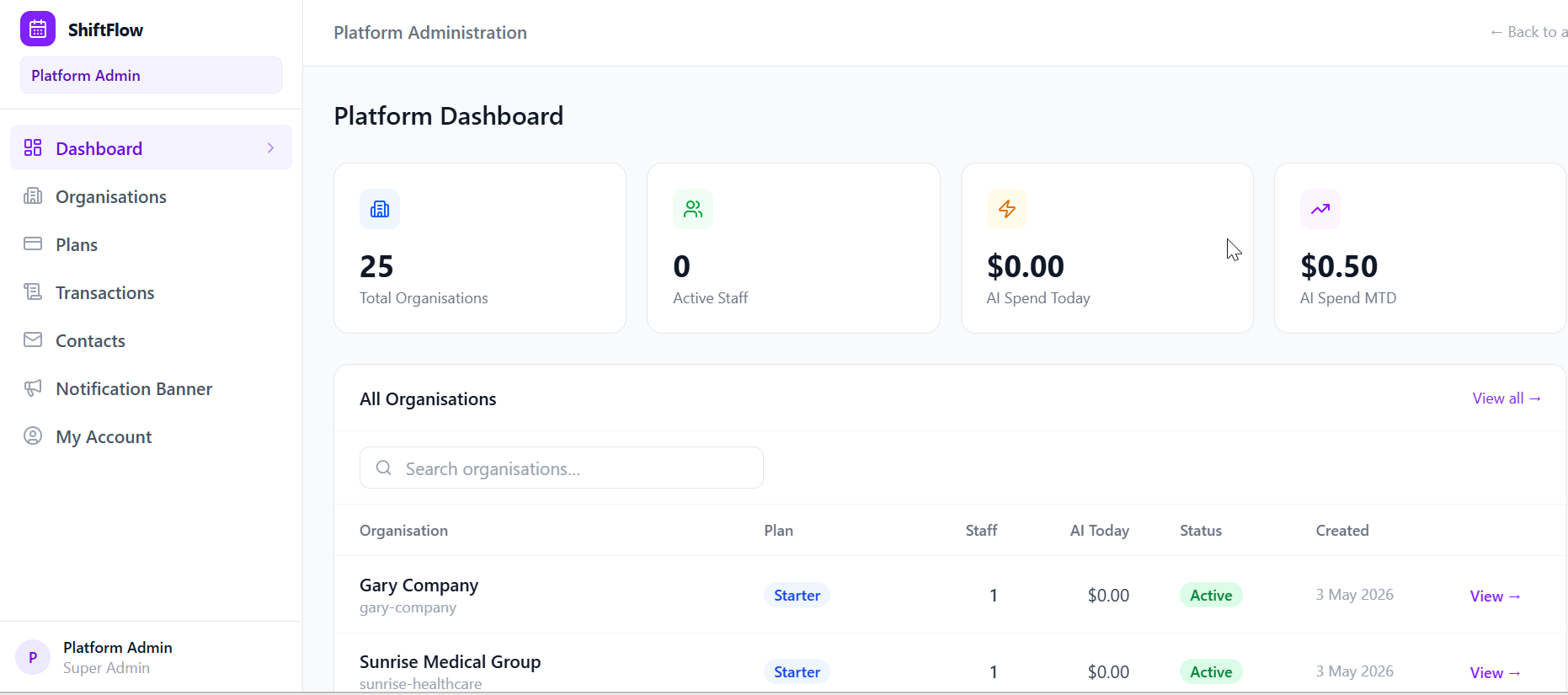
The platform is properly multi-tenant, meaning each organisation is fully isolated from every other one. One user can belong to multiple orgs but only has one active at a time. Plans are tiered: a free Starter plan for teams up to 25 staff, a Professional plan that unlocks the AI features and SMS, and Enterprise for anything custom.
Critically, plan limits are enforced at the API layer -- not just hidden in the UI. That matters for anything you'd actually put in front of paying customers.
There's a super-admin dashboard for managing all organisations, plans, and subscriptions. And every write to the database is captured in an immutable audit log, with before-and-after JSON snapshots. If something goes wrong, you can trace exactly what happened and when. A nightly cron job handles housekeeping: resetting AI spend counters, archiving old rosters, cleaning up expired invitations, and pruning notification records.
The Tech Stack
I kept things sensible. Next.js 15 with the App Router for the framework. TypeScript throughout. PostgreSQL as the database, with Prisma as the ORM -- the schema ended up at 31 models. Better Auth for authentication and multi-tenancy. Anthropic's Claude (claude-4-5-sonnet) for the AI features. Resend for email, Twilio for SMS. Tailwind CSS v4 for styling. Radix UI primitives and Lucide React for components. dnd-kit for drag-and-drop. React Hook Form and Zod for form validation. All tied together with pnpm workspaces.
Nothing exotic. All solid, well-supported tools. The kind of stack you'd choose if you were building something you actually planned to ship.
What 24 Hours of AI-Assisted Development Actually Looks Like
I want to be honest about this, because I think there's a lot of hype out there about what AI coding tools can and can't do.
What they're genuinely good at is helping you move fast on the structural stuff. Scaffolding a schema, wiring up an API route, getting a component to the right shape. The kind of work that used to take hours of looking up docs and writing boilerplate now takes minutes.
What still requires your brain is the product thinking. Deciding what the workflows actually are. Figuring out which edge cases matter. Making calls about what to build and what to leave out. Understanding how the pieces fit together. The AI doesn't know that leave should create a scheduling lock, or that timesheet variances over 15 minutes are worth flagging. You have to know that and tell it.
The result is more like a very capable development partner than a magic code generator. You're still driving. But you're covering ground at a pace that wasn't possible a couple of years ago.
By the end of 24 hours, I had something that was close to production-ready, subject to more thorough manual testing. That's not a claim I would have been comfortable making about a day's work before these tools existed.
What's Next
Right now this is a buildathon project. But the problem it solves is real, and the bones of the app are solid. I'll be doing more testing and documenting the architecture properly over the coming weeks.
If you're running a team on spreadsheets and you're curious about what a tool like this could look like for you, I'd love to hear about your situation. Drop me a line.
And if you're an AI builder thinking about what's possible in a constrained timeframe -- I'd encourage you to enter the next one. 24 hours is surprisingly enough time to build something that matters.
The views and opinions expressed in this article are my own and do not reflect those of my employer or any organisation I am affiliated with.
Discussion
Please to join the discussion.